![Logos.webp]](https://help.shopbox.com/hs-fs/hubfs/Logos.webp?height=22&name=Logos.webp)
In this article, we will cover:
· What the Tripletex integration does
· How to connect Tripletex with Shopbox
· The difference between Simple and Simple Multiple Categories
· How VAT groups can help you choose the right setup
What does the Tripletex integration do?
The Tripletex integration makes it possible to transfer your Shopbox POS sales to Tripletex, so your sales data can be posted directly in your accounting setup. Once the connection is in place, you can choose whether your revenue should be posted in a simple, consolidated way or in a more detailed category-based structure.
How to connect Tripletex with Shopbox
Before you can use the integration, you need to create an employee token in Tripletex and add it to Shopbox.
Step 1: Enable API 2.0 in Tripletex
- Log in to your Tripletex account.
- Go to Company.
- Select Our customer account.
- Scroll down to Modules and additional services.
- Enable API 2.0.
Step 2: Create your employee token
- Open Tripletex and click your user icon.
- Go to My Profile.
- Click More and choose API access.
- Click New token.
- Select Adapted setup.
- Select All entitlements.
- Enter Shopbox as the application name.
- Give the token a name, for example Shopbox.
- Click Create token.
- Copy the token and save it securely. It is shown only once.
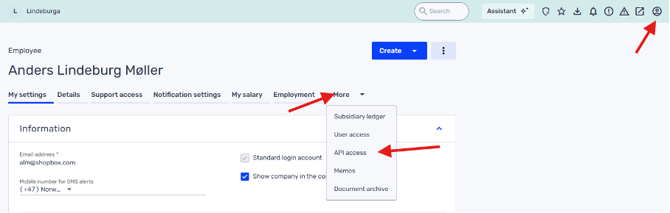
Open My Profile, then More, and select API access.
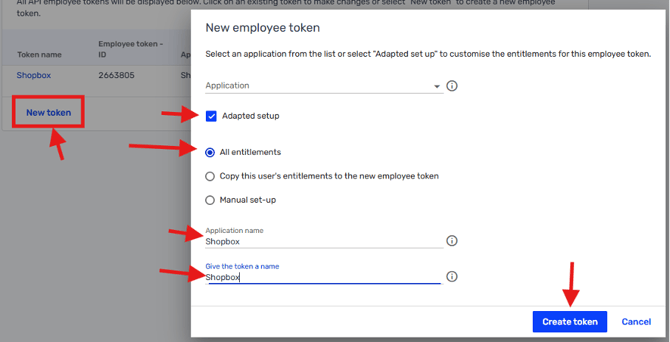
Create a new employee token using Adapted setup and All entitlements.
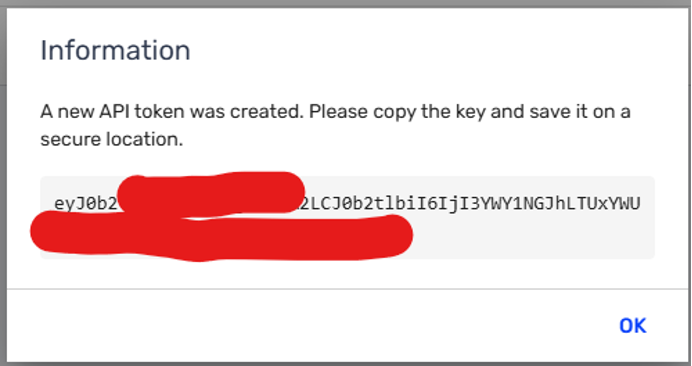
Copy the token and store it somewhere safe before closing the window.
Step 3: Add the token in Shopbox
- Log in to Shopbox Backoffice.
- Open Integrations from the left-hand menu.
- Find Tripletex and click Start or Edit.
- Paste the token into the Employee Token field.
- Save or confirm the setup.
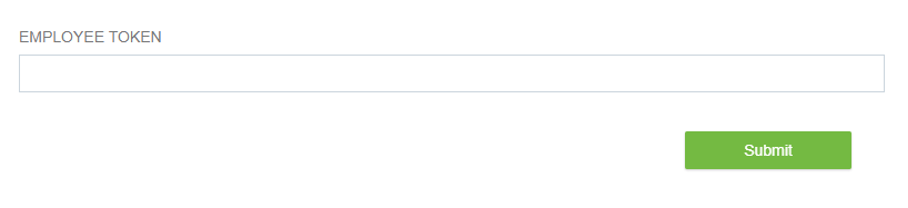
Paste your employee token into the Employee Token field in Shopbox.
|
Tip: If the connection does not work the first time, double-check that API 2.0 is enabled in Tripletex and that the token was copied in full. |
Choose the right integration setup
The right setup depends on how detailed you want your bookkeeping to be. The key difference is whether your revenue is posted to one sales account or split by category.
|
Setup |
Best for |
Main benefit |
|
Simple |
Businesses with one VAT group and a preference for a straightforward setup |
Posts revenue in a simple, consolidated way with fewer postings |
|
Simple Multiple Categories |
Businesses with multiple VAT groups or a need for category-level bookkeeping |
Splits revenue by product category for more detailed accounting |
Integration type: Simple
The Simple setup is the most straightforward option. With this setup, your daily revenue is posted to one sales account. This gives you a simpler accounting structure and usually results in fewer postings in Tripletex.
- You want all revenue posted to one account.
- You prefer a simple and easy-to-maintain setup.
- You want fewer postings in Tripletex.
- You only use one VAT group.
Integration type: Simple Multiple Categories
The Simple Multiple Categories setup gives you a more detailed bookkeeping structure. Instead of posting all revenue to one account, revenue can be split by product category, which gives you more insight into how different parts of your business perform.
- You want revenue split by product category.
- You need more detailed bookkeeping in Tripletex.
- You use multiple VAT groups.
- You want separate account mapping for different sales categories.
How VAT groups affect your choice
VAT setup is often a good way to decide which integration type is right for you. If you only use one VAT group, Simple is usually the best choice because it keeps the setup easy to manage. If you use multiple VAT groups, Simple Multiple Categories often makes more sense, because it gives you a more detailed setup and makes it easier to work with category and VAT-specific mappings.
Which setup should you choose?
As a rule of thumb:
- Choose Simple if you want the easiest setup and have one VAT group.
- Choose Simple Multiple Categories if you need more detailed bookkeeping, category-based revenue posting, or use multiple VAT groups.