![Logos.webp]](https://help.shopbox.com/hs-fs/hubfs/Logos.webp?height=22&name=Logos.webp)
To connect Shopbox with PowerOffice, first install the Shopbox extension in PowerOffice:
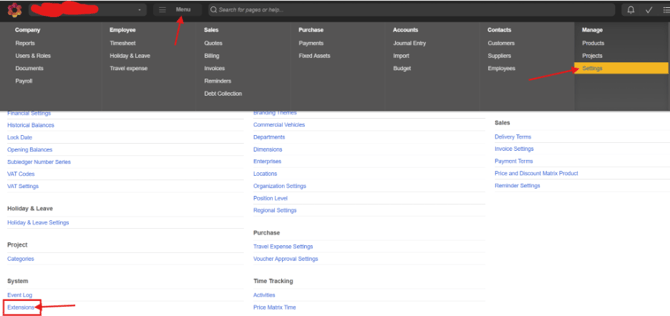
- Open PowerOffice.
- Click Menu.
- Click Settings.
- Click Extensions.
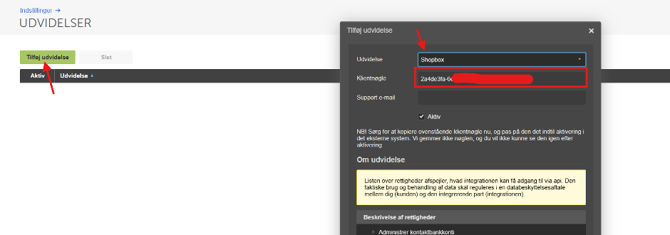
- Click Add extension.
- Search for Shopbox.
- Copy and save the Client Key. It is shown only once, so make sure to store it securely.
Account Setup
Sales Account
Choose the account where your daily revenue should be posted.
Cash
Choose the account where cash payments and your till balance should be posted.
Cash Difference
Use this account for any cash discrepancies identified during end-of-day cash counts.
Cash Rounding
Use this account for rounding differences on cash payments.
Cash to Bank
Choose the account used when cash is removed from the till and deposited into the bank.
Card Payments
Dankort: Choose the account where Dankort payments should be posted.
Visa/Mastercard: Choose the account where Visa and Mastercard payments should be posted.
Other: Choose the account where other card payments, such as Amex or Maestro, should be posted.
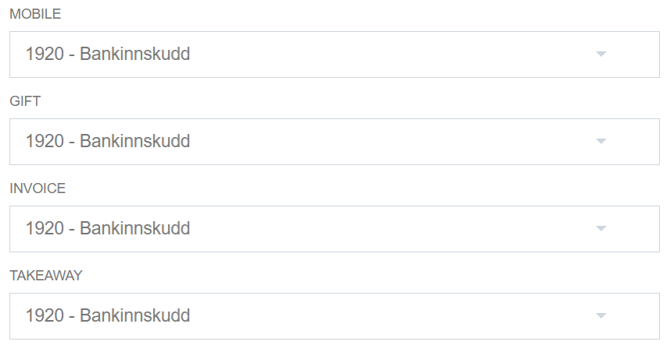
Mobile Payment: Choose the account where MobilePay payments should be posted.
Gift Card: Choose the account where gift card payments should be posted.
Invoice: Choose the account where invoice sales created directly from Shopbox should be posted.
Takeaway: Choose the account where payments from takeaway platforms, such as Wolt, should be posted.
Category Mapping
Map your product categories from Shopbox to product groups in PowerOffice so they are linked correctly for accounting.
Fallback Product Group
Use the fallback product group when an item has not been assigned to a product group. In that case, the posting will go to the account linked to the fallback group.
VAT Settings
Map the VAT rates from Shopbox to the correct VAT accounts in PowerOffice.
Choose the appropriate VAT account for each rate you use. Sales with that rate will be posted to the selected account.
Invoice Synchronization
You can enable or disable invoice synchronization with PowerOffice.
When invoice synchronization is enabled, Shopbox automatically creates invoices in PowerOffice whenever an invoice sale is made.