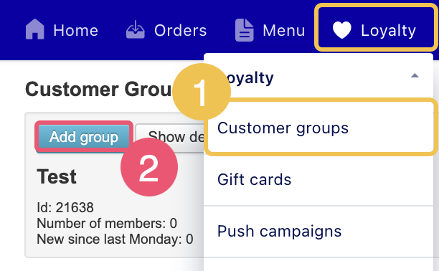
Create customer groups in Weorder Customer groups help you target specific customers with discounts or campaigns. They also allow you to follow campaign results and keep track of customer segments in Weorder. How to create a customer group Go to Loyalty > Customer groups. Select Add group. Enter a name for the group. Select Save. Your customer group is now created ✅ Related articles Add customers to groups Set up discounts
![Logos.webp]](https://help.shopbox.com/hs-fs/hubfs/Logos.webp?height=22&name=Logos.webp)